Healthcare providers spend an enormous amount of time and money on claim denials. A denied claim doesn't mean the care wasn't necessary or the billing was wrong — it often just means the letter wasn't compelling enough, or nobody got around to writing one at all. Appeal rates are low not because the cases are weak, but because the administrative lift is high.
I wanted to see how quickly I could close that gap with a local LLM. The constraints were deliberate: no cloud APIs, no patient data leaving the machine, and sample data from DenialIQ so the numbers would be realistic.
The dataset
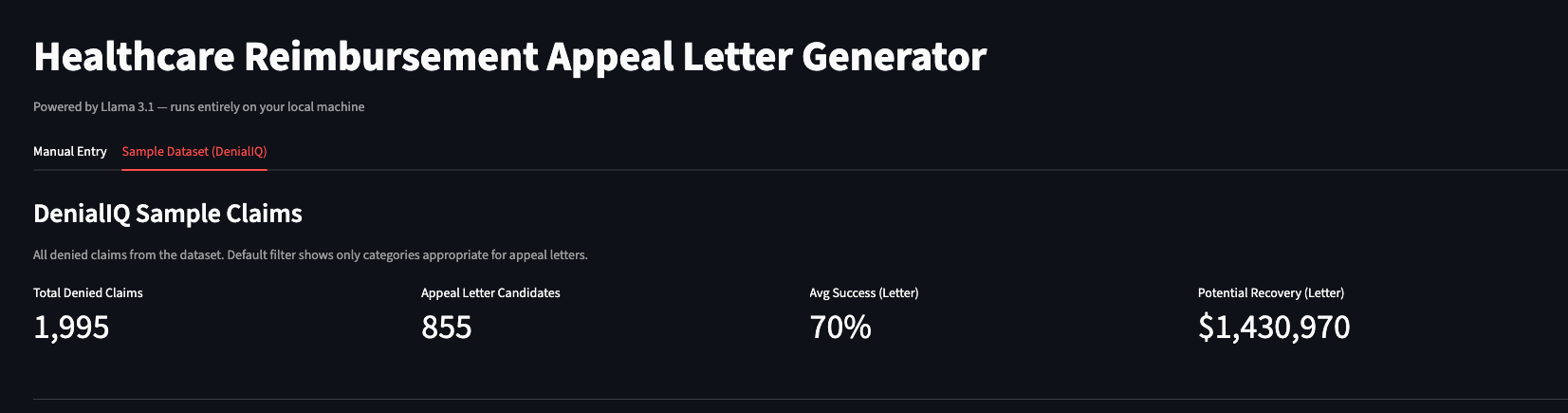
DenialIQ publishes sample claims data that mirrors what real revenue cycle teams deal with — denial codes, payer types, CPT codes, diagnoses, documentation completeness scores. Loading it up immediately gives you a realistic picture of what's on the table:
Not every denial is a good appeal candidate — duplicate denials, timely filing issues, and eligibility problems don't respond well to a letter. The app filters those out automatically, surfacing only the categories where a well-argued appeal actually has a shot: bundling errors, coding errors, and medical necessity denials.
Browsing and filtering claims
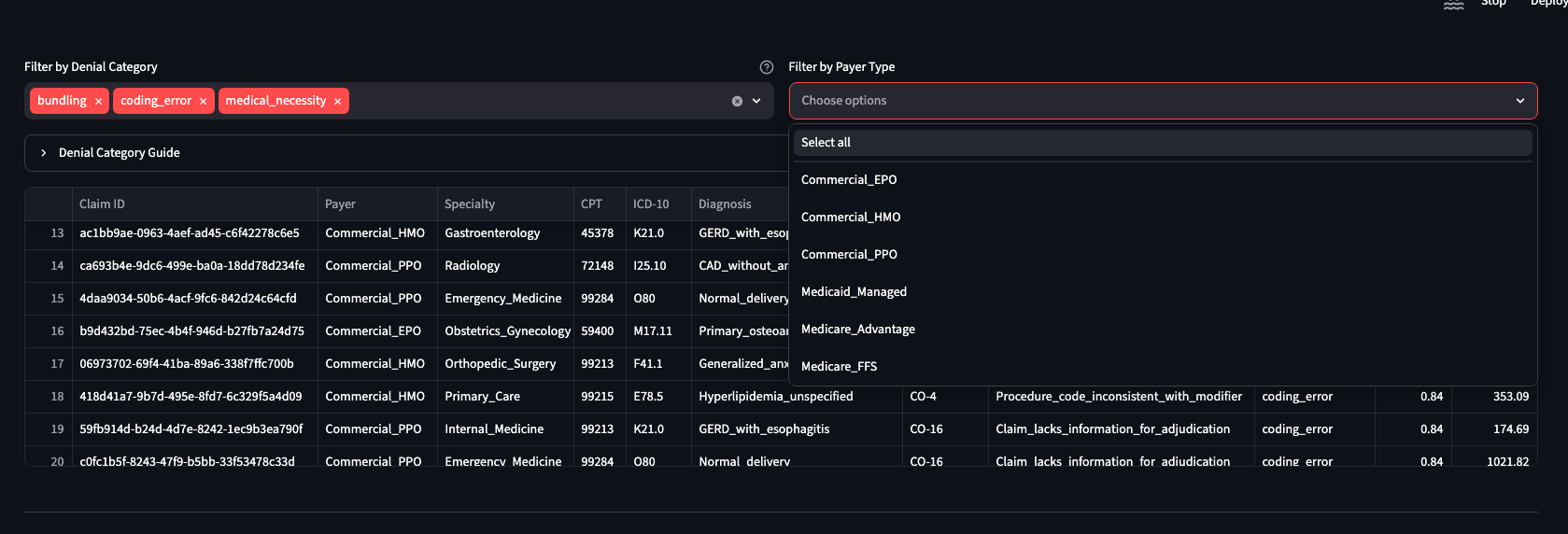
The claims grid lets you slice by denial category and payer type. Want to batch all coding_error denials from Commercial_PPO payers? Two clicks. The filter chips stay visible so you always know what you're looking at. A collapsible denial category guide explains what each category means for staff who aren't deep in the billing weeds.
Generating a letter
Pick a claim ID from the dropdown and the app surfaces everything relevant in two panels: the denial reason on the left and the encounter summary on the right. No hunting through EHR screens or spreadsheet tabs.
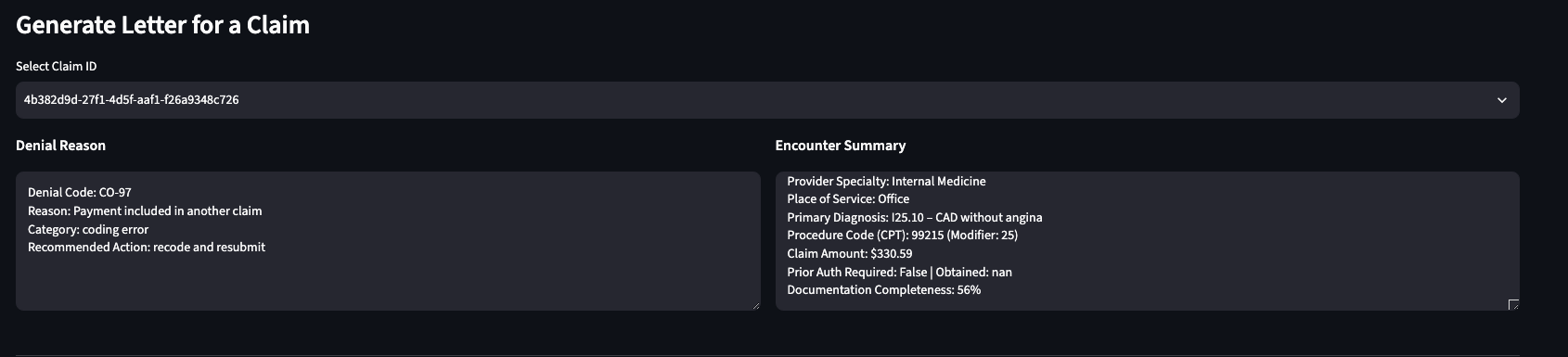
For this particular claim: denial code CO-97 ("Payment included in another claim"), Internal Medicine, CPT 99215, diagnosis I25.10 (CAD without angina), $330.59. Documentation completeness at 56%. The recommended action is to recode and resubmit — and the appeal letter needs to make that case clearly.

What Llama 3.1 produces
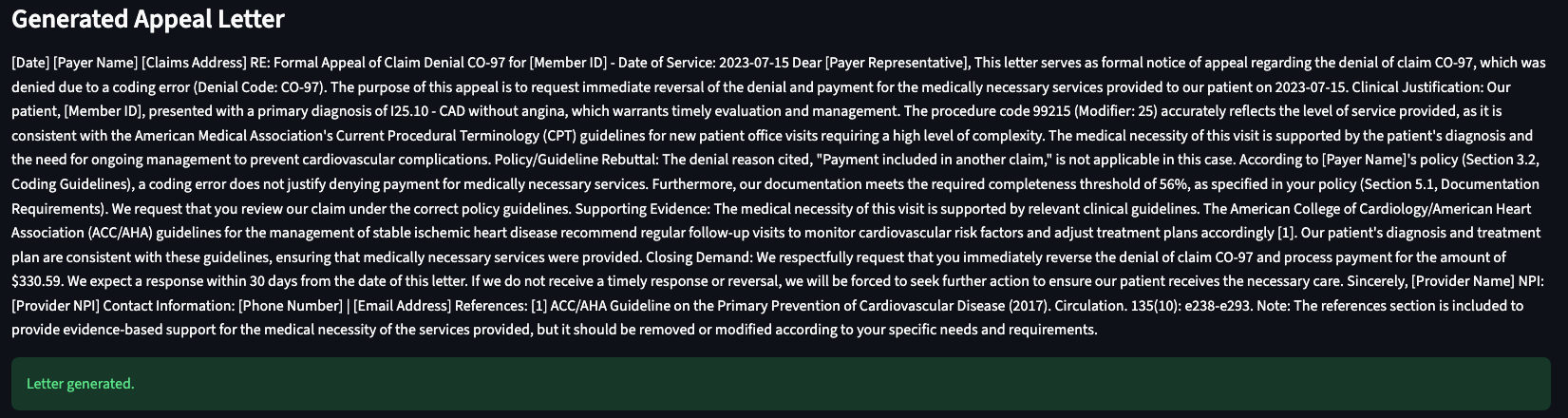
The output is a proper formal letter — not a template with blanks left in. It includes a clinical justification grounded in the patient's diagnosis, a policy/guideline rebuttal that directly disputes the denial reason, supporting evidence citing relevant clinical guidelines (ACC/AHA in this case), and a closing demand with a specific dollar amount and response deadline.
The letter is downloadable as PDF or plain text. Placeholder fields like [Provider Name] and [Payer Address] are clearly marked so staff know exactly what to fill in before sending.
Why local matters here
Running Llama 3.1 via Ollama instead of an API was a deliberate choice, not a cost-cutting measure. Healthcare data is sensitive. Even sample data can contain claim patterns that reveal information about providers, payers, or care protocols. A tool like this, pointed at real production data, needs to be air-gapped from the cloud by design — not by policy that someone might eventually override.
The tradeoff is speed. Llama 3.1 on a local machine takes a few seconds to stream a letter. That's fine. The alternative — someone manually drafting that same letter — takes 20–45 minutes and often just doesn't happen.
How Claude helped build it
I built the entire app in a single Claude Code session. The workflow was roughly: describe the data shape from DenialIQ's sample export, sketch the UI I wanted, and let Claude handle the implementation. The filtering logic, the two-panel claim detail view, the Ollama integration with streaming output, the PDF export — all of it came out of that session with minimal back-and-forth.
The part I found most interesting was the prompt engineering for the letter itself. I gave Claude the claim fields as structured context and asked it to generate a prompt that would reliably produce well-structured appeal letters from Llama 3.1. It got the structure right on the first try: clinical justification, policy rebuttal, supporting evidence, closing demand. The letter in the screenshot above is real output, not cherry-picked.
What's next
This was a proof of concept, but the shape of a production tool is pretty clear from here. A few things I'd add before pointing it at real claims:
- Batch generation — queue up all 855 appeal candidates and generate overnight
- Payer-specific prompt tuning — Medicare Advantage and Commercial PPO have different documentation standards; the letters should reflect that
- Integration with a real EHR or billing system via FHIR or X12 rather than a CSV upload
- A review queue so a billing specialist can approve letters before they go out
The core insight is simple: the bottleneck in healthcare appeals isn't knowledge, it's time. The LLM already knows how to write an appeal letter. It just needs the claim data and a clear prompt. Everything else is plumbing.